A database per tenant: what you gain and what you pay
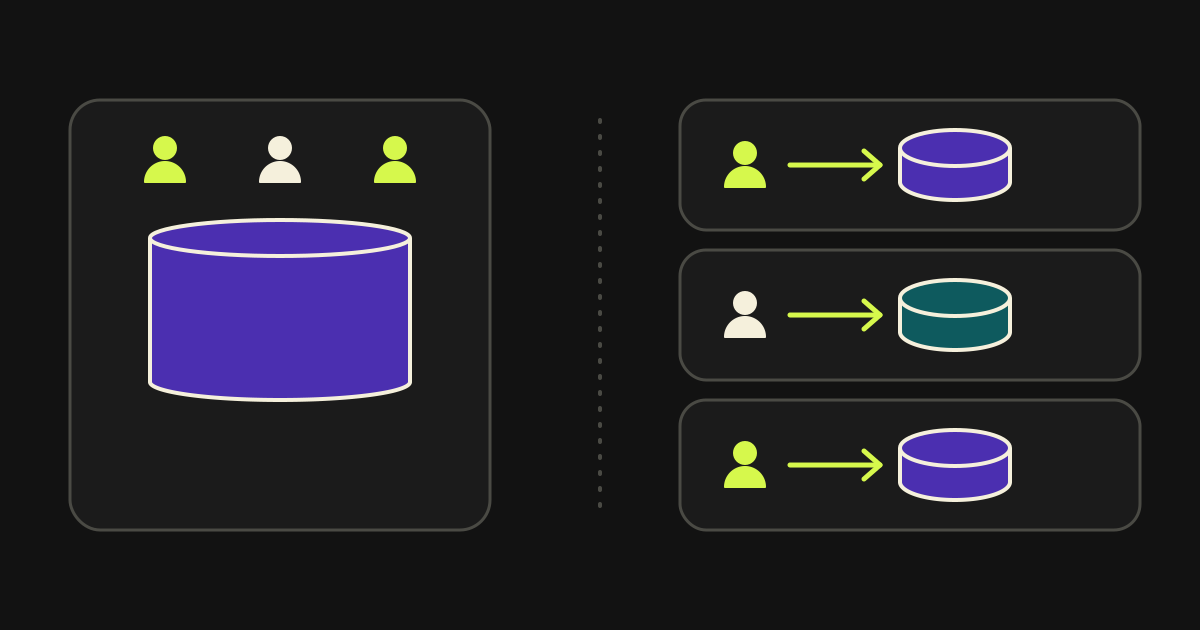
A database per tenant gives you isolation that is easy to explain to a customer and an auditor, and it bills you in migrations, backups and analytics. I chose it and ran it, on a healthcare platform in America.
At a glance: database per tenant
- On a healthcare platform in America every customer had its own database
- In a silo model each tenant has its own storage with no co-mingled data
- Partitioning data does not by itself guarantee isolation
- Migrations must run on every database and be tracked per database
- Analytics across many databases need a separate analytical store
What does “database per tenant” mean, and where does it sit among the options?
In multi-tenant SaaS, customer (tenant) data can share tables with a tenant column, sit in separate schemas of one database, or live in a whole database each. The third option is called silo: each customer has its own storage, with nothing co-mingled.
AWS describes the split as silo and pool. In silo there is a distinct storage construct for each tenant. In pool the data sits together and a tenant identifier says who owns what. A middle path exists too, with a shared database and a schema per customer.
The healthcare platform I designed was at the silo end. It was a SaaS product for quality and compliance, with modules for analytics, standards, policy management, a records vault and inventory. Every customer had its own database.
First, a distinction that trips up many teams. Data partitioning and isolation are not the same thing. AWS stresses it: splitting data does not mean one tenant cannot reach another's. Isolation has to be enforced separately, with permissions, identities and checks.
What do you gain with a database per tenant?
You gain three things: isolation that does not depend on a correct WHERE clause in every query, the ability to do things for one customer that you cannot do for all of them at once, and a short answer when a customer asks “where is my data?”.
Isolation is the main one. In a shared table, one forgotten tenant filter is enough for a customer to see someone else's data. With separate databases, the same bug in the code returns nothing or fails, because the customer's connection cannot reach the other data. In healthcare, where a leak has serious consequences, that is a real advantage.
The second is flexibility per customer. You can restore one customer's database to an earlier point in time without touching the others. You can move it, grow it, or delete it when the customer leaves. A heavy customer does not slow the rest, because they do not share the same space. What AWS calls the noisy neighbour problem shrinks.
The third is compliance. When a customer or auditor asks how data is separated, “each customer has its own database” is short and checkable. In pool you have to explain and prove every filtering mechanism.
What do you pay in migrations?
In migrations you pay for the fact that every schema change must run on every database, and that databases may be in different states. With a hundred customers you do not have one migration but a hundred, and each can succeed or fail on its own.
The first problem is consistency. If the migration succeeded on ninety-nine databases and failed on one, the application code has to work with both schemas until the exception is fixed. That shapes how you write changes: add first, move second, remove last, and never rewrite something from under the previous version of the code.
The second is visibility. You need one place that shows which schema version each database is on. Without it, you do not know which customer got left behind.
The third is time. A migration that takes seconds on a small database can take long on a large one and lock tables. Always rehearse on a database that looks like your largest.
A practical rule for migrations across many databases
Every migration should be safe to run twice and compatible with the previous version of the code. That way you can re-run it on a database that failed without fear of breaking the ones that succeeded.
What changes in backups?
In backups, a database per tenant changes the unit: instead of one large copy you have many small ones, and each can be restored on its own. The gain is targeted recovery. The cost is that you have to confirm each copy exists and works.
Restoring one customer is the big advantage. If a customer deletes data by mistake, you restore only their database, without rolling everyone else back. In pool that is much harder, and you end up recreating data by hand.
The cost is supervision. With many databases, a backup that did not run does not announce itself. In the AWS infrastructure I built, AWS Backup was the central backup mechanism and CloudWatch the daily watch. The aim is for a gap to show early, not at the moment you need the copy.
| Topic | Database per tenant | Shared database |
|---|---|---|
| Restoring one customer | Independent, with their own database | Hard, you must extract only their rows |
| Effect of heavy load | Limited to one customer | Shared by everyone |
| Migrations | One per database, each can fail separately | One for all |
| Backups to supervise | One per customer | One in total |
| Analytics across all customers | Needs a separate analytical store | One query |
A backup that has never been tested is not a guarantee. That is why restores must be tested regularly, in a separate environment, with a real backup of one customer and not a sample. The test answers two questions: does the backup open, and how long does the restore take. The answer to the second is what you will tell the customer when the day comes, and you want to know it before that day. With many databases, the test runs on a rotating sample of customers, so that over a period every one has been checked.
How do you run analytics across a hundred databases?
Across a hundred databases you do not write one query that reads them all live. You copy the data you need for analysis into a separate analytical store, with a consistent schema and a tenant identifier, and the queries run there, not on the production databases. That way the analysis does not weigh on the performance of the application.
This is the cost teams underestimate. The first question of the kind “how many users signed in across all customers this month?” has no easy answer. Running the same query a hundred times and merging the results is slow, fragile and loads the customers' databases.
The solution has two parts. First, you decide which data may leave for analysis and in what form. In healthcare that is not a technical detail but a compliance decision, and it is taken before the first line is written. Then you build the pipeline that moves it, in a way that survives failure and can be re-run.
For analytics inside the platform itself, the ones a customer sees about themselves, there is no problem: they read from the customer's own database. The problem appears only when you want to see everyone together, for the product or for the team running it.
How does day-to-day operation change with a database per tenant?
Day-to-day operation changes in three places: how you create a new customer, how the application finds the right database on every request, and how you remove a customer who leaves. All three must be done by code and not by manual steps, or every new customer becomes a small project.
Creating a new customer
In a shared table, a new customer is a new row. Here it is a whole database: with its schema at the current version, with the initial data the application needs, with access rights and with an active backup. If these are done by hand, every sign-up is delayed and every omission shows up later, when the customer has already started working. Creation should be one step that runs from code and checks by itself that it finished correctly.
Finding the right database on every request
From the first moment of every request, the application must know which database it will talk to. Usually this comes from the identity of the user or from the address they use, and the code that picks the connection must live in one place, not scattered across the application. That place is critical: a mistake here sends a customer to the wrong database, and that is why it needs the strictest tests in the platform.
When a customer leaves
When a customer leaves, a separate database makes the deletion clean: you drop one database, not rows scattered over many tables. Before that you need an agreed procedure. Who approves the deletion, what is exported for the customer, how long the backups are kept and when they are deleted too. In healthcare these are set by data-retention obligations and must be written down before the first departure.
What you test before every change
With many databases, testing on one is not enough. You test every schema change on a database like the largest ones, on a database at an older schema version and on a new one. You also test that a user of one customer cannot reach another customer's data, even when the code has a bug. That check is what justifies, in practice, the choice of a separate database.
When is a database per tenant worth it, and when is it not?
It is worth it when isolation is a requirement of your field, as in healthcare, when you have a few large customers, and when each customer will stay for years. It is not worth it when you have thousands of small customers with very little data each. There, the cost per customer cannot be justified.
AWS notes that many products end up with a hybrid: separate infrastructure for large or demanding customers and shared infrastructure for the rest. That is not a failure of clean architecture, it is the usual path.
My own judgement, from experience: if your field demands proof of separation, start with silo and pay the operating costs early, automating migrations and backups from day one. The worst case is starting with pool and having to split the database later, when customers are already live.
If you are designing a platform with similar requirements, let's talk. The infrastructure the platform ran on, and one of the defences protecting it, are described in the article on blocking scanners by their behaviour. My wider path is on the home page.
Steps to decide:
- Write down what your field requires for data separation: law, contracts, customers who will ask.
- Estimate how many customers you will have in three years and how large.
- Decide how migrations will run on every database and how you will see each one's version.
- Decide how backups will be taken and checked per customer.
- Design the analytical store before you need it.
Frequently asked questions: database per tenant
Separation is easier to prove, because a wrong filter in the code is not enough for one customer to reach another's data. It does not replace permissions and access controls: isolation has to be enforced separately from partitioning.
Usually yes, in infrastructure and in operating effort. AWS describes silo as the model with the strongest separation and, correspondingly, higher cost. Weigh that cost against the value of isolation in your field.
With an automated process that applies them to each database, records the result per database and lets you retry only where it failed. Every migration is written to be safe if run a second time and compatible with the previous code.
You can, but it is expensive. Moving from a shared database to separate databases, with customers live, is a major project. That is why the choice deserves thought from the start, based on what your field requires.
You do not have to move everyone at once. Start with the customer who has the strongest isolation requirement, build the creation procedure and the migrations around that one, and move the others gradually. That way you test the operating cost on a small scale before committing, and you keep the option of stopping at the hybrid model that AWS describes.
Sources: database per tenant
Last updated:
More articles: database per tenant
Quote Builder: quote, payment and project tracking in one app
The visitor builds a quote for a website, platform or cloud project alone, pays, and then follows the project in a client area of their own. The same app works for every company.
Praion AI Content Studio: text, images and video in one place
Text, images and video for a business’s posts, from the models that do each job best, in one place. Nothing is scheduled without your approval.
How to keep an AI agent that writes production code under control
The model is not the guarantee. The guarantee is three things: completion criteria that leave no room for interpretation, verification of every finding before it is accepted, and automatic rollback when a deployment fails. What I learned building Planner.